Live signal

From live signal
to meeting record.

Record the room. Transcribe on device. Review every decision before it leaves your hands.

  • Audio stays on your deviceunless you choose to export or save it elsewhere.
  • Offline after model setupcore recording, transcription, and minutes generation can run locally.
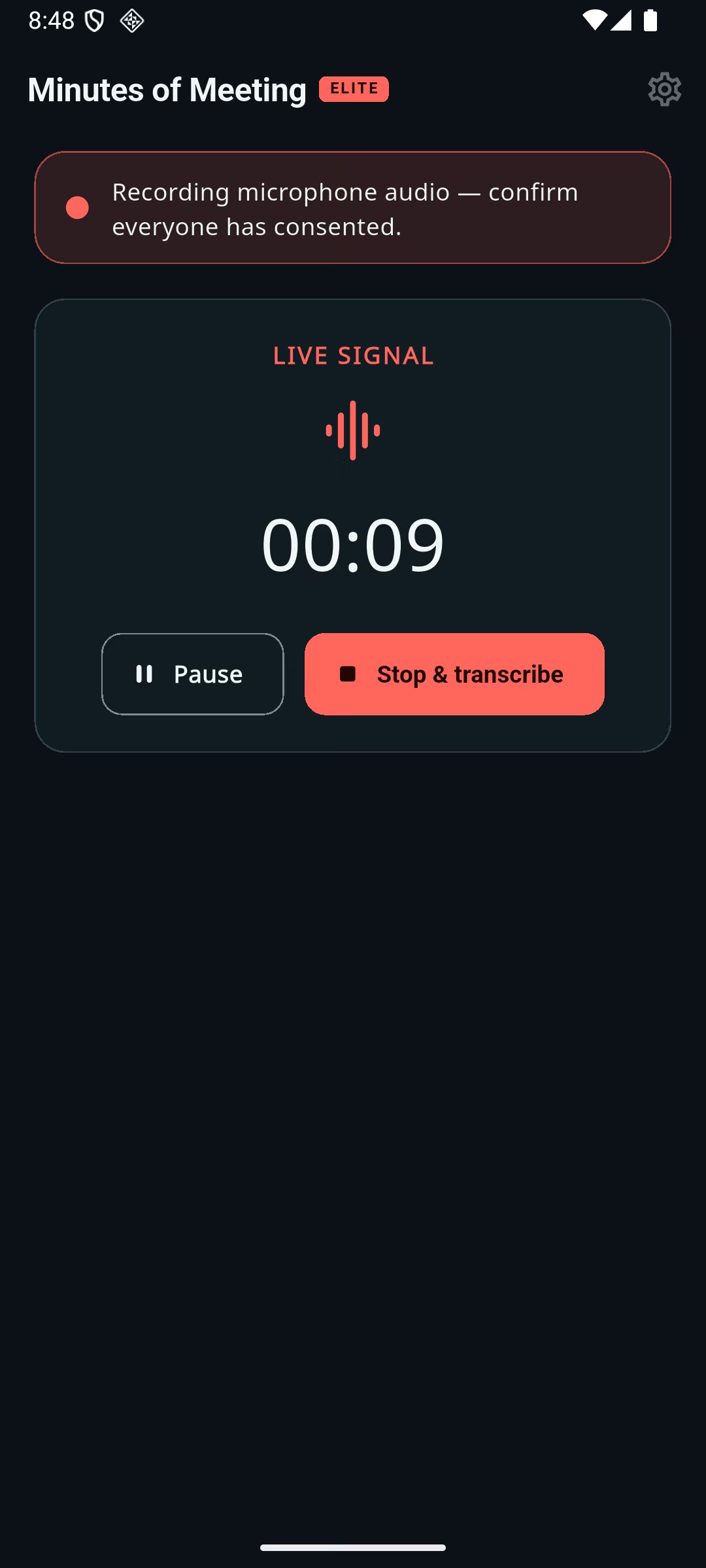
Minutes of Meeting Elite recording screen showing a visible consent reminder, live signal, timer, pause, and stop and transcribe controls

Meeting record · reviewed draft

Product planning review

Summary

The team reviewed the launch plan and agreed on the next validation steps.

Decision

Complete the onboarding review before the release checkpoint.

Evidence S4 · 08:52

Action item

Confirm device and store evidence before publishing.

Owner: assign during review

Automated drafts can contain errors. Review before sharing.
Follow the signal

One deliberate flow

From conversation to minutes.

Nothing happens behind your back. You start the recording, review the automated output, and choose what leaves your device.

  1. 1

    Record

    Capture microphone audio with a visible recording state and participant-consent reminder.

  2. 2

    Transcribe locally

    Download a Whisper model, then process the recording on your device through sherpa-onnx.

  3. 3

    Review evidence

    Edit the transcript and check confidence labels and source sentences before relying on the draft.

  4. 4

    Share deliberately

    Export audio, transcript, minutes, or a complete package only when you choose.

Download the model that fits your device.Tiny, Base, Small, and Medium options trade storage and speed for accuracy.
About local transcription

Evidence, not guesswork

A draft you can trace back to the conversation.

Generated decisions, action items, and risks carry confidence labels and evidence markers. Select a marker to return to the source sentence, then edit what the meeting actually established.

Minutes are a drafting aid—not an automatically authoritative record.

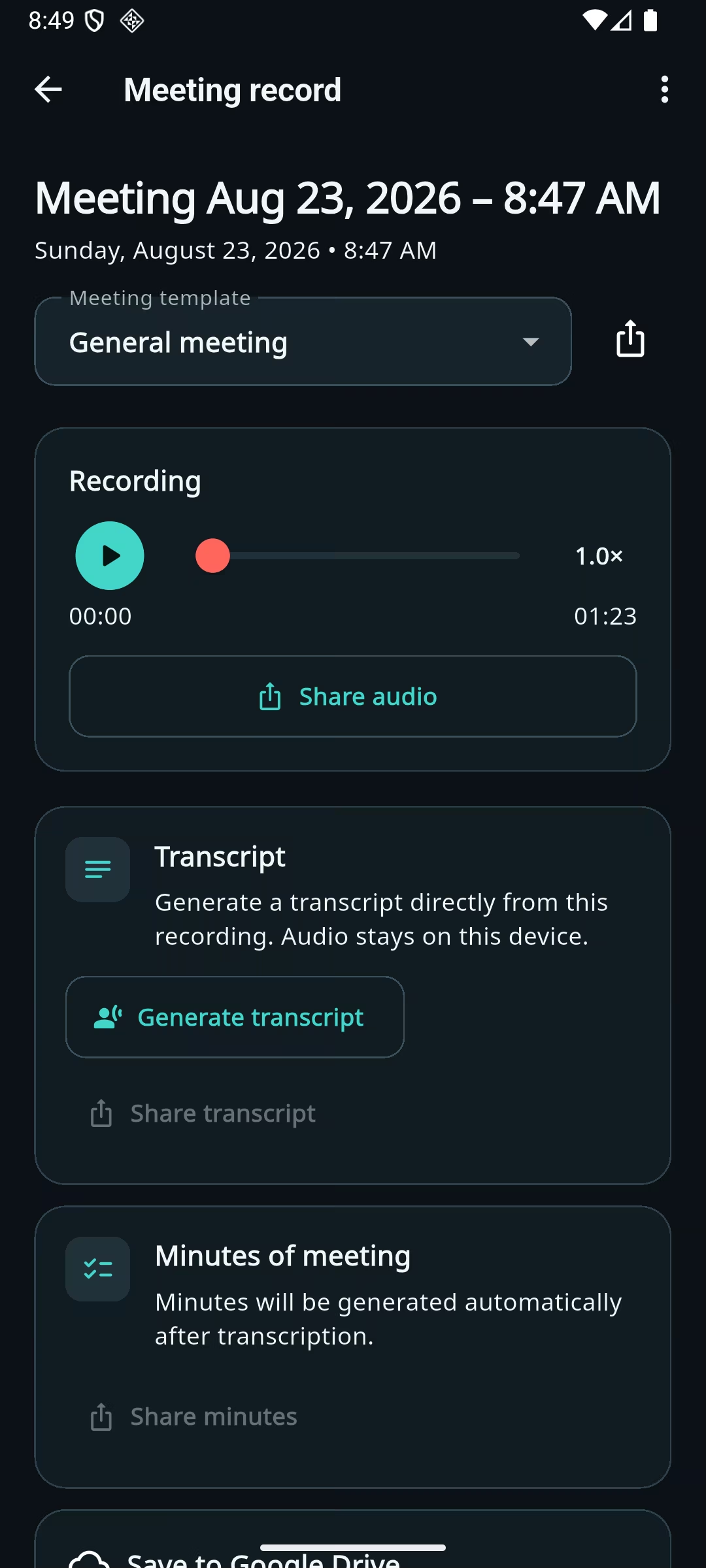
Meeting record screen with local recording playback, transcript generation, and minutes sections
Transcript · 08:52

“Complete the onboarding review before the release checkpoint.”

Evidence S4 · high confidence

Decision: Complete onboarding review first.

Local-first by design

Your meeting stays with you.

On your deviceRecording, transcript, minutes, templates, settings, and downloaded models
Only when requestedModel downloads, store purchases, manual sharing, and optional Google Drive saves
Default-offGoogle Drive backup and optional Firebase diagnostics
Never part of the flowOpenAI API processing of meeting audio, transcripts, or minutes
Read the privacy policy

Built for the devices in the room

Android, Huawei Android, and iPhone.

The app is implemented for Android/Huawei Android and iOS. Local features do not require Google Mobile Services. Google Drive is optional and unavailable on supported devices without Google services.

No public store links yet. Verified store links will appear here only after the listings are live.

Supported targets
  • Android
  • Huawei Android / EMUI
  • iOS 15 and later
Physical-device and store qualification remain separate release gates.

Frequently asked

Before you press record.

Does the app send my meeting to OpenAI?

No. The app does not use the OpenAI API and does not send recordings, transcripts, or minutes to OpenAI. Downloaded Whisper model weights run on your device through sherpa-onnx.

Can it work offline?

After you install a transcription model, core recording, transcription, and local minutes generation can work without an internet connection. Model downloads, platform purchases, optional Google Drive, and optional diagnostics require network access.

Is the generated transcript guaranteed to be accurate?

No. Accuracy varies with the model, device, speakers, language, noise, and recording quality. Transcripts and minutes are editable drafts that should be reviewed before use or sharing.

Does it record calls or other apps?

The implemented recording flow captures microphone audio. It does not claim direct capture from phone calls, Teams, Zoom, WhatsApp, or other applications.

Do I need an account?

No proprietary app account is required. Connecting a Google account is optional and only enables user-requested saves to Google Drive.

How does the trial work?

In trial-enabled builds, you start the seven-day evaluation explicitly. It requires no payment method, does not renew, and does not bill automatically. Store availability and localized lifetime pricing are confirmed only inside an eligible published build.

Need a clear answer?

Support without a data-collecting form.

Email the support address directly. Do not include confidential meeting audio, transcripts, access tokens, or purchase credentials.

Go to support